Ostranauts Gamepad and Steam Deck Support
Controller play since Fire in the Hold — with keyboard still king for dense UI
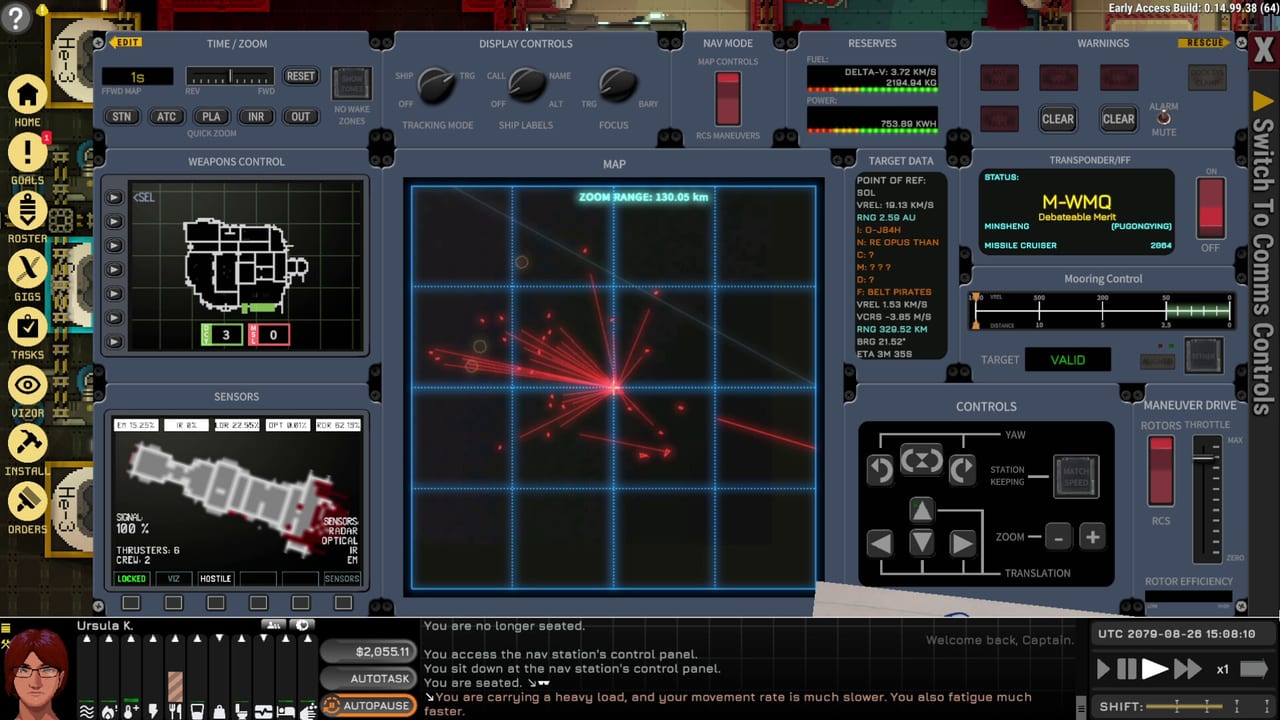
Gamepad and Steam Deck support arrived with Fire in the Hold alongside Steam Cloud saves — a quality-of-life milestone before Ostranauts 1.0 shipped on 2026-08-03. Blue Bottle Games did not replace the keyboard-and-mouse workflow; they added a viable controller layer for captains who want to play on couch, handheld, or hybrid setups. The official interface remains English only, and the densest screens — PDA bulk orders, nav map plotting, install paint mode — still favor mouse precision. This page explains what works on controller, how Options rebinding maps pads, when Steam Deck helps versus hurts, and how Cloud saves interact with modded installs from Steam Workshop.
Contrary to early Early Access assumptions, controller support exists since Fire in the Hold — not absent at 1.0.
What Fire in the Hold added
The April 2026 milestone shipped:
- Steam Deck verification path — playable handheld with expected UI compromises
- Gamepad input across walking, QAB interactions, and nav console subsets
- Steam Cloud — sync saves between PC and Deck if you enable Cloud in Steam client settings
Read the Fire in the Hold update page for combat and travel context — Deck play matters most on long super-fast-forward transits, not first-hour tutorial micromanagement.
Keyboard and mouse remain primary
Ostranauts is a tile sim with finance spreadsheets, conduit routing, drag-select Orders, and COMMS text — interfaces built for cursor precision. Default keyboard workflows documented on Keybinds assume:
- WASD camera pan on foot; helm mode remaps thrust
- Space pause before catastrophic mis-clicks
- 1–4 QAB hotkeys for muscle-memory repairs
- Mouse walk, right-click context, and multi-tile paint selects
Gamepad maps analog sticks to movement and face buttons to QAB slots, but dense PDA filters and install grids slow down without a mouse. Treat controller as comfort layer for familiar loops, not first-time learning.
Options rebinding
Open Options from the pause menu to inspect and rebind controller buttons alongside keyboard entries where supported. Practical tips:
- Mirror critical keyboard habits — pause, inventory, speed controls — on shoulder buttons you can reach without claw grip
- Keep helm thrust on sticks; do not swap yaw to buttons if you already struggle with nav console alignment
- Test rebound layouts docked at OKLG before Ceres combat — remapping mid-fight invites disaster
Document your layout in a notebook — Cloud saves do not sync custom Steam Input community profiles across machines unless you export them separately.
When Steam Deck helps
Deck shines on travel segments and station walking:
- Super fast-forward transits between OKLG and outer destinations — see Stations and Travel
- Casual role-play inside stations — bars, kiosks, gig boards
- Monitoring life support alarms from couch while SFF runs
- Second-save experimentation while PC runs a main career
Handheld thermal and battery limits still apply — long torch burns with combat loadouts drain faster than peaceful salvage hops.
When gamepad hurts
Avoid controller-first workflows for:
- Precise RCS docking and VREL matching — How to Fly and Dock alignment rings demand fine analog or keyboard taps
- Railsniping and turret slewing in Ship Combat — matched VCRS intercepts need micro corrections
- Bulk Install and Orders painting — PDA and Orders drag-select across decks
- First salvage EVA — How to Salvage QAB chains with cutting tools
Hybrid play works: mouse at dock for refits, Deck underway for burns. Steam Cloud syncs progress if both devices run the same build branch.
Steam Cloud and save hygiene
Steam Cloud copies saves between machines — useful for Deck/PC splits. Caveats:
- Enable Cloud per game in Steam properties
- Avoid simultaneous play on two devices — conflict copies may appear
- Workshop mods with different load orders between machines corrupt expectations — read Steam Workshop backup advice
- Major patch days — wait for hotfixes noted on Updates before syncing mid-refit saves
Suggested control reading order
- Keybinds — defaults controller inherits from
- Nav Console — helm modes on stick
- PDA and Orders — know what stays mouse-only
- Getting Started — tutorial improved in 1.0; learn on keyboard first
- This page — switch to Deck after first OKLG redock
Related pages
- Controls hub — full input reference
- Keybinds — keyboard defaults
- Nav Console — COMMS and RCS panels
- PDA and Orders — bulk queue workflows
- Fire in the Hold — milestone that added Deck support
- Version 1.0 Launch — stability pass on top of Deck features
Frequently Asked Questions
Quick answers for spacers who want to stay alive.
Does Ostranauts support controllers at 1.0?
Yes — **gamepad and Steam Deck support shipped with Fire in the Hold**, not absent at launch. Keyboard and mouse remain best for dense UI; see Keybinds for defaults.
Can I sync saves between PC and Steam Deck?
Enable **Steam Cloud** in Steam client properties for AppID 1022980. Avoid playing the same save simultaneously on two devices, and match Workshop mod lists — see Steam Workshop.
Is Steam Deck good for docking and combat?
Deck suits travel SFF and station walking more than **precise RCS** docking or railsniping. Use keyboard/mouse for How to Fly and Dock learning, then hybrid handheld for burns.